For construction controllers
Check the field records behind billing and payroll
See what the crew worked on, who approved the extra work, and which purchases belong to the job. CrewView gives controllers those records before billing and payroll.
Field work and financial review
Follow the record before you use the total
Capture the field detail
Employees record hours against projects and tasks. Project teams record extra work on T&M tickets and tie purchase orders to the project receiving the goods.
Explore construction timecardsCheck the approvals
Review who signed off on extra work and who approved a purchase. Resolve questions with the project team while the work and order details are still current.
Hand off the record
Use the approved ticket for billing support, compare asset expenses, and prepare the pay period for a configured export. Your accounting and payroll systems handle posting and payment.
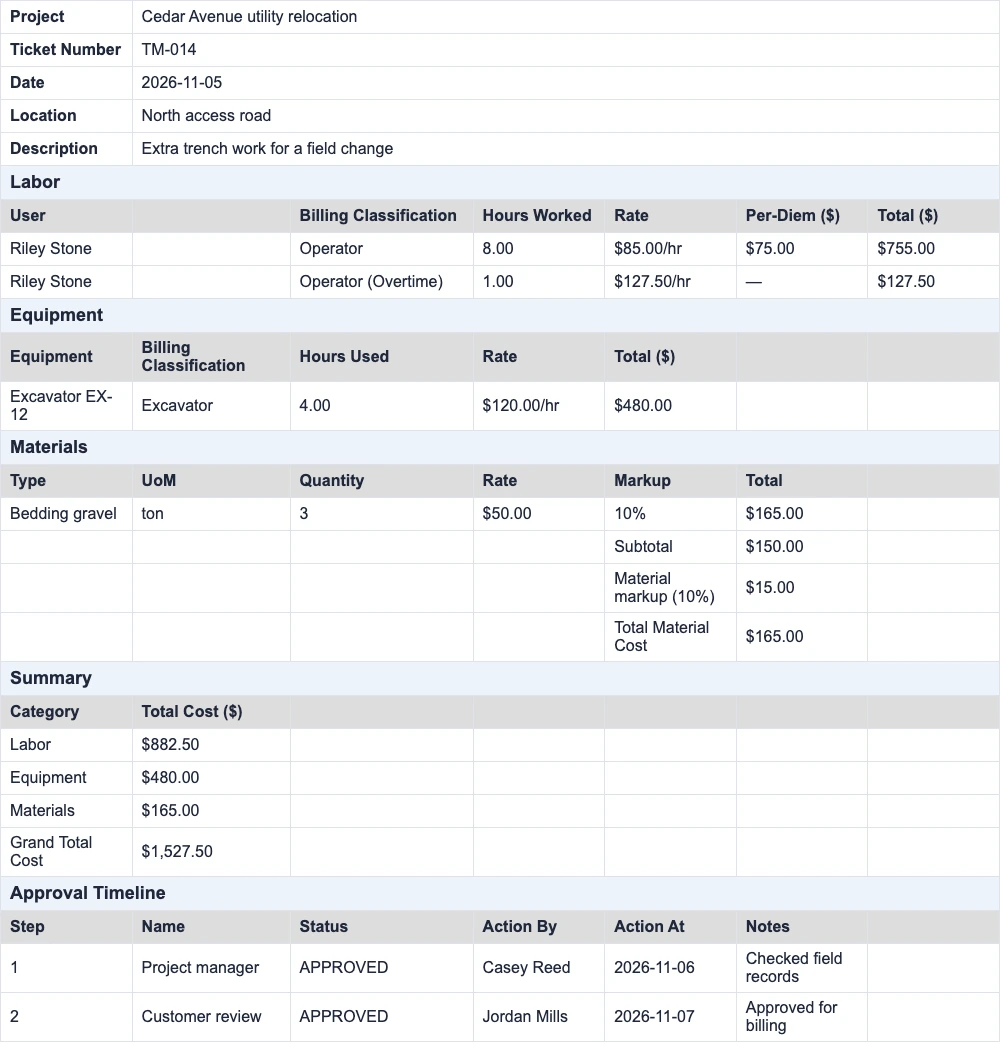
Check the extra work behind a billing line
A change adds trench work on Cedar Avenue. The project manager reviews the T&M ticket and its hours, equipment, materials, and per diem. After the customer approves it, the controller can download the Excel detail and attach it as backup for billing. T&M tickets require Pro, organization enablement, and contract setup.
See the sample T&M ticketReview purchase orders against spending limits
The same job needs a $4,000 order for pipe. The project manager creates the order on the project. If it falls outside their spending authority, CrewView uses the configured control levels to show which approvals are needed before the order can proceed.
The controller can check the project, vendor, amount, and approval status on the order. Purchase orders are available on Pro. Enable the feature and set spending authority and approval rules before sending orders for review.
Check costs and prepare the next close
Compare asset costs before approving another repair
Open cost history for the excavator used on Cedar Avenue. Review the repair and operating expenses entered by your team, then compare this year with last year before approving another repair or deciding to replace the excavator.
Explore equipment managementSave a report for the next review
Use unit reports to check quantities by project. With Advanced Reporting enabled on Pro, ask the report builder for hours by project over the period. Check the result, save the report to run again, and export the rows you need.
Explore the AI report builderHand reviewed time to payroll
With time approvals enabled, check supervisor approvals and resolve exceptions before the pay period closes. The Pro ADP Workforce Now export requires enablement and mapping for employee file numbers, pay codes, and project cost numbers. Download the paydata CSV and import it for review in ADP.
See the ADP export setupSee the connected CrewView workflow
Frequently Asked Questions
Questions about CrewView for controllers
Can controllers review labor by project and task?
Yes. CrewView records employee time against projects and tasks and provides exportable time reports. That detail supports labor allocation and project review.
Does CrewView calculate our full job profitability?
Use CrewView labor and production records as inputs to your financial review. Your accounting records provide the wider cost and revenue picture needed to assess full job profitability.
Will the export work with our accounting software?
CrewView offers downloadable time reports, including CSV exports. Bring your import requirements to the demo so the team can check the fields and mapping your accounting workflow needs.
See why construction managers are switching to CrewView.
Speak with a CrewView adviser at (801) 613-0344.