Project management, time tracking, equipment, and safety in one mobile tool built for construction companies.

Construction Timecard Software

Construction Timecard Software Built for Field Crews

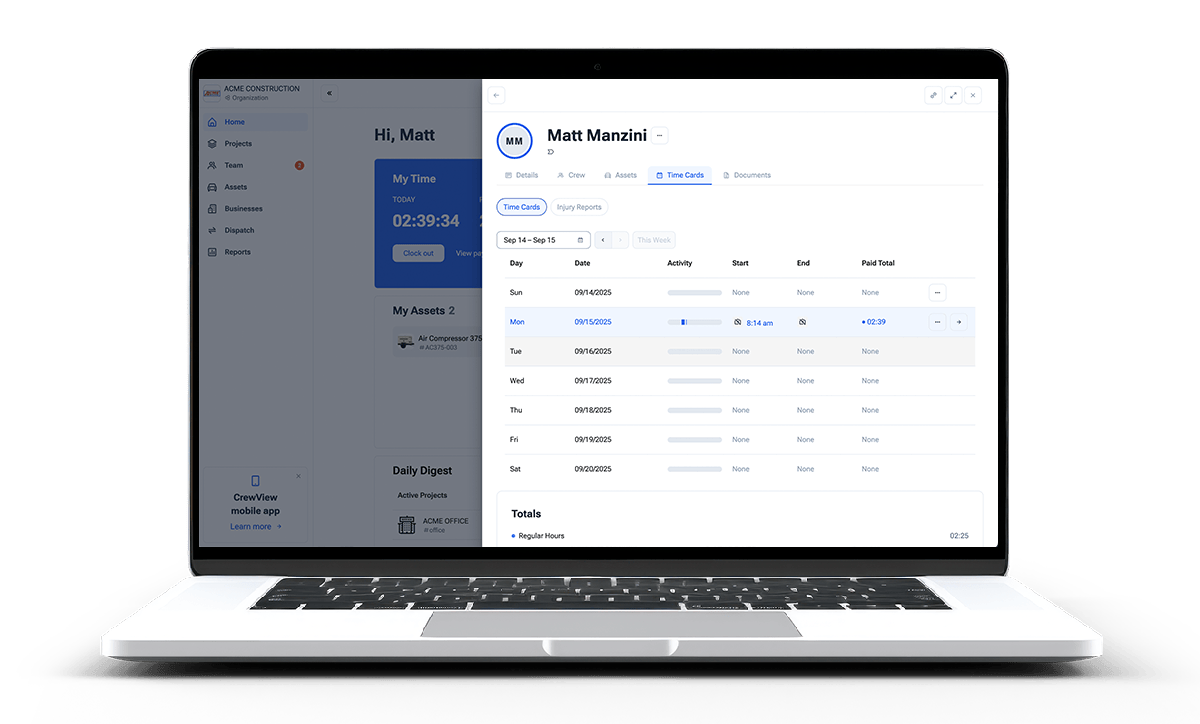
CrewView gives construction crews a direct way to record time by project and task. GPS-verified clock-ins, supervisor review, and payroll-ready exports replace paper cards and end-of-week guesswork.

Two crew members checking a tablet together at the start of a shift
Manage, Assign, and Track
CrewView time tracking on a laptop

Time Records You Can Use

Capture the Hours. Keep the Job Context.

A timecard is more useful when it shows where the employee worked, what they worked on, and who approved it. CrewView keeps those details together.

01

Time Tracking Built-In

GPS-verified clock-in/out, track time per project and tasks, and get complete job logs all in one place.

02

Manage Crews Simply.

Organize all your teams from a single dashboard. Assign tasks, dispatch workers, and collaborate efficiently.

03

Streamline Payroll.

Edit time cards, export reports, and reduce admin overhead to ensure accurate payments.

An office administrator working at a desktop in a contractor office
Simple time tracking and management

Boost Productivity. Reduce Admin.

Stop manual tracking and endless spreadsheets. CrewView automates time management, freeing up your team.

  • Geolocation tracking verifies employee location at clock-in/out.
  • Eliminate errors and discrepancies in time reporting.
  • Focus on building, not on paperwork.
A construction foreman reassigning his crew on a rugged tablet at a job site
Reassign in seconds Right skills, right job

Empower Your Field Teams.

Give your crews the tools they need to succeed, while maintaining control and oversight.

  • Reassign team members to new tasks in seconds
  • Match the right skills to the right job, fast
  • Simplify daily routines for your team, from the office to the job site.

From Clock-In to Payroll

One Labor Record, Without the Weekly Cleanup

Record time in the field

Employees clock in from their phones and select the assigned project or task. Location data gives managers another point of verification.

Explore the GPS time clock

Review time with context

Supervisors see the hours beside crew assignments and project work, so mistakes can be corrected before they reach payroll.

Explore crew scheduling

Export approved records

Send clean time records to payroll without retyping paper cards or matching names across several spreadsheets.

See payroll workflows

Replacing Paper Timecards

Build a Timecard Process Payroll Can Trust

Construction timecard software works best when the field entry, supervisor review, and payroll export follow one defined process. Set the rules first, then make the common action easy.

Capture time where the work happens

Ask employees to record the start and end of work from the field instead of rebuilding the day on Friday. Keep the required steps short enough to use at the beginning of a busy shift. CrewView records the employee, time, location, project, and task in one entry. That context gives supervisors a better starting point than a handwritten total and helps the company place labor on the work that received it.

Use project and task names the crew knows

A long accounting code may make sense to the office and still confuse the employee choosing it on a phone. Present projects and tasks with recognizable names, remove old options, and explain how to record a move between jobs. Better choices reduce corrections and give managers more dependable labor detail for job costing, production review, and future scheduling.

Give supervisors an exception-based review

Do not ask a supervisor to investigate every ordinary entry. Focus attention on missing punches, unexpected jobs, overlapping time, unusual hours, and manual corrections. Compare the timecard with the crew assignment and project work, then ask the employee when the records do not match. A consistent review protects accurate pay while catching process problems before the pay period closes.

Keep one approved record for payroll

Define who approves each employee or crew and when approval is due. After the supervisor resolves exceptions, export the accepted hours rather than entering them again. CrewView preserves the project and task detail behind the total, which gives payroll a clean record and gives project managers useful labor information without asking either team to maintain a separate spreadsheet.

Test the workflow through one full pay period

Pilot the process with a supervisor, a field crew, and the payroll person who receives the final export. Follow normal shifts, job changes, missed punches, corrections, approval, and payroll delivery. Ask where the employee hesitated and where the office still rebuilt information by hand. Adjust the policy and project list before moving every crew into the system. A complete pilot catches more problems than a clock-in demonstration.

Frequently Asked Questions

Construction Timecard Software Questions

The right setup depends on how your crews move between jobs and how payroll needs the final record. These are the questions contractors ask before replacing paper timecards.

What is construction timecard software?

Construction timecard software records employee and crew hours against the job and task where the work happened. It replaces paper cards and disconnected spreadsheets with field entries that supervisors can review before payroll.

Can CrewView track time by project and task?

Yes. Workers record time against assigned projects and tasks, giving managers a clearer labor record for payroll, job costing, and project review.

Does CrewView verify where employees clock in?

CrewView can capture geolocation at clock-in and clock-out. Managers can review the location with the time entry instead of trying to reconstruct where the work occurred later.

Can a supervisor correct a timecard before payroll?

Yes. Authorized supervisors can review and edit timecards before the approved hours are exported for payroll processing.

Can CrewView track an entire crew?

CrewView keeps employee assignments, crew schedules, tasks, and time records connected. Managers can see who was assigned to the work and compare the plan with the submitted hours.

Does CrewView replace payroll software?

CrewView prepares accurate, approved labor records and exports them for payroll. It does not position itself as a payroll processor.

See why construction managers are switching to CrewView.